Metadata Best Practices: Apple Music Style Guide 2.2
Following the Apple Music Style Guide is mandatory to maintain your music distribution rights with Apple Music and iTunes. The guide sets standards for organizing and presenting metadata: titles, artists, track versions, album details. It gives clear instructions to ensure your content displays correctly on release day. Proper metadata is required by Apple and other DSPs.
Share this guide with your team. Review it before every release.
Key Guidelines in the Apple Metadata Style Guide
These points cover essentials. Read the full guide for complete details.
-
Title and Artist Information: Provide accurate song titles, artist names, and featured artists. Clear identification matters.
-
Album Information: Follow the format for album titles. Include release dates and explicit content labels.
-
Artwork Requirements: Meet Apple's size, resolution, and content standards. High-quality artwork counts.
-
Genre Classification: Choose the right genre categories. Proper classification helps users find your music.
TIP: Use keywords like "Artwork," "Explicit," "Various Artists" to search the guide quickly.
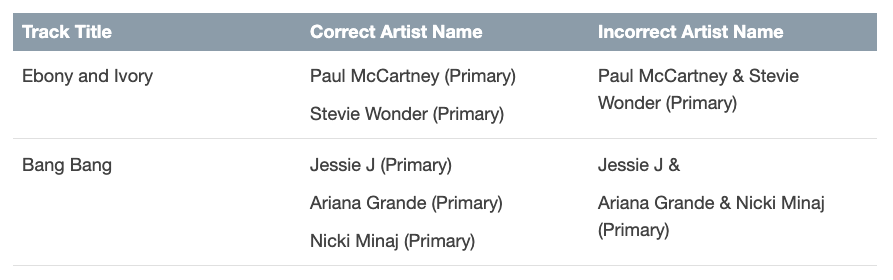
Example from the guide: How to avoid creating a Compound Artist:
Metadata Issues and Apple Tickets
If Apple finds a metadata issue in your release, it can affect visibility in some or all territories on release day. Missing or incorrect metadata may result in removal from all Apple Music and iTunes stores.
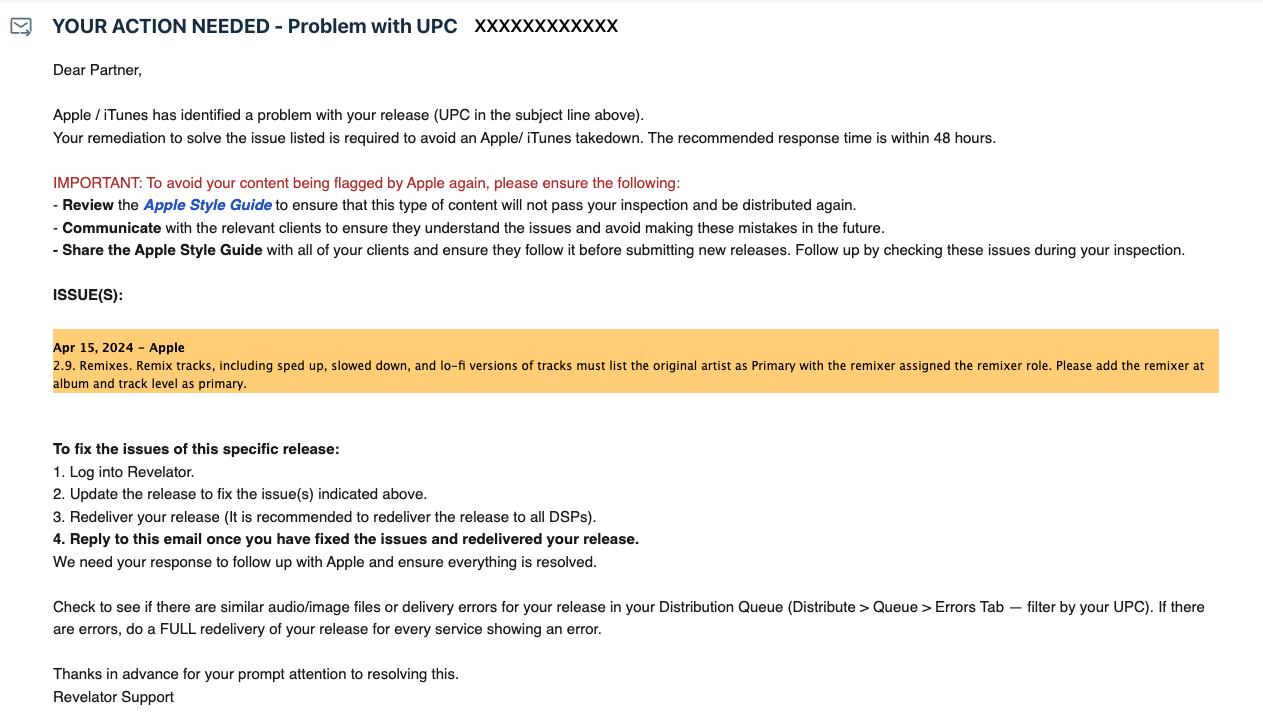
When Apple detects an issue, they generate a ticket. We notify you via email through Hitskope Support. The email describes the problem, requests a fix within 48 hours, and provides step-by-step instructions. Once you fix it, we follow up with Apple to close the ticket. Failure to resolve within 48 hours may result in Apple removing your release.
Example: An Apple ticket from Hitskope Support:
Questions about the Style Guide or resolving an Apple ticket? Contact us at support@hitskope.com.